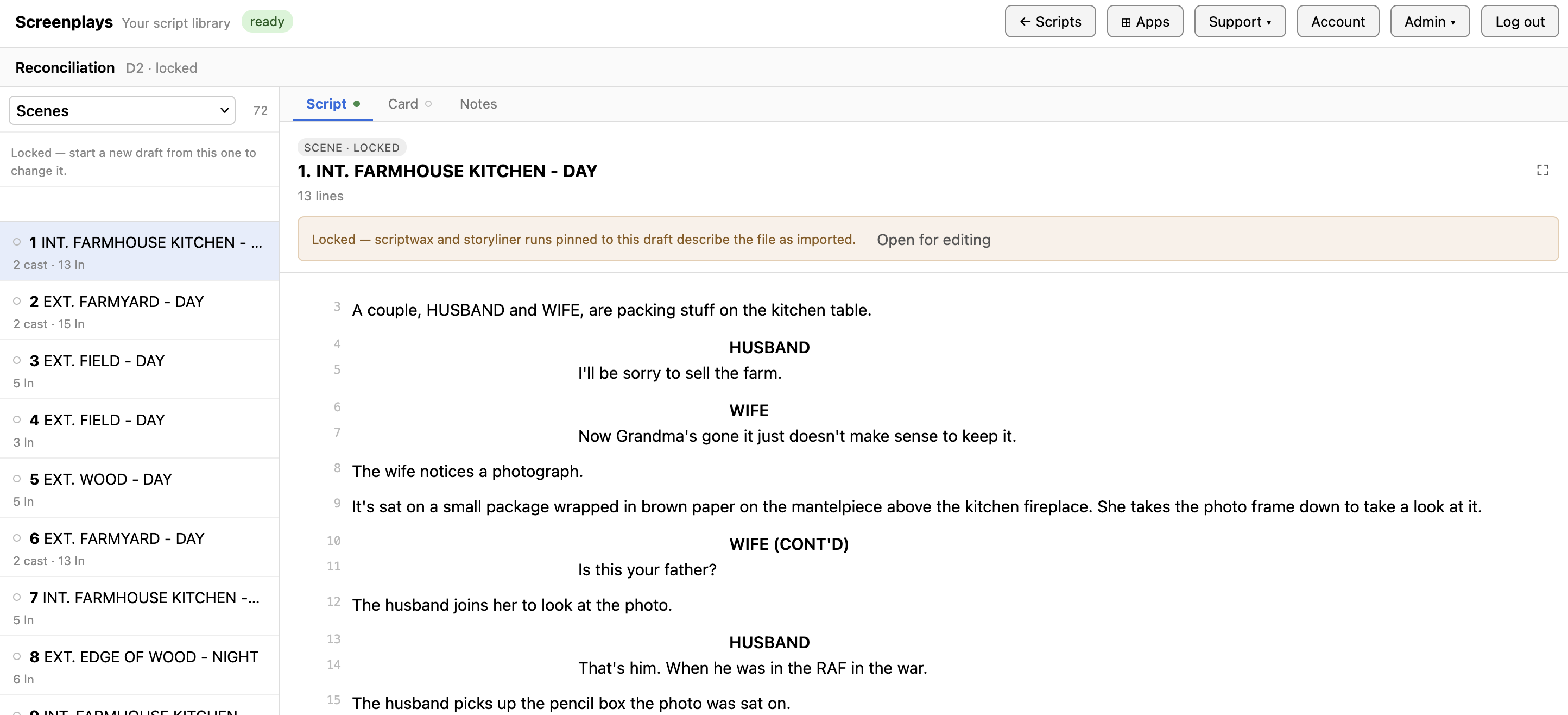
Screenplays now lets you write scripts based on imported or blank new scripts.
The workflow is: Add a new blank script or import a script (FDX or Fountain format) then create one or more drafts from that script to work with.
Col1 now lists the drafts created for an news/imported script selected in the dropdown.
The original imported script is read-only but you can create as many editable drafts of this original script as you want.
Col2 now lets you select from a dropdown of options that drive the behaviour of col3:
- Scenes - to view/add/edit the scene content
- Characters - to view/add/edit the character dialog
- Search - to search for a term in the script and display the script content to view/add/edit
- Cut Scenes - to manage the cut/restore of scenes
Col3 content is determined by the option selection in col2.
The Scenes Col3 panel is tabbed:
- Script - to edit the scene content
- Cards - to manage scene index cards
- Notes - to manage scene notes/to-dos
The Scenes option is the main editing option that displays the script in col3 and lets you create specific script elements for your script:
- Cmd1 = a new scene heading
- Cmd2 = a new action line
- Cmd3 = a new character plus using ( to trigger a VO, OS or CONT'D for the character)
- Cmd4 = a new parenthetical
- Cmd5 = a new dialogue line
- Cmd6 = a new transition
You can also export a script to PDF or Fountain (text) formats via the Publisher app.